
Shift Roster Attendance Software with Geofencing for Security Agencies in Hubli
Shift management decides who works when, then checks that the plan actually happened. Built for security agencies in Hubli, with a 14-day free trial.
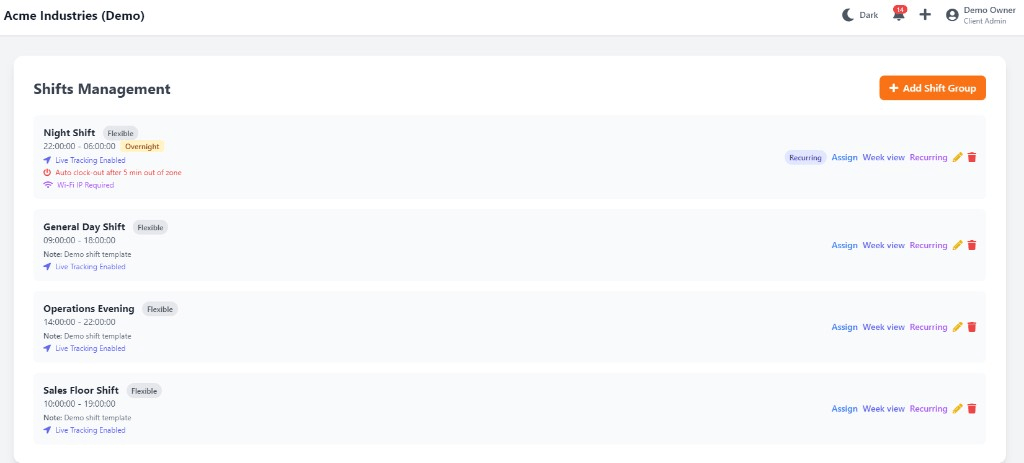
Shift Roster Attendance Software with Geofencing for Security Agencies in Hubli: overview
This guide covers shift management for security agencies in Hubli: how it works in Attend Mitra, and what to check before you pick a tool.
The short version: Attend Mitra gives you shift definitions, rosters and plan vs actual, running on employees' Android phones instead of a machine at the door. You can try it free for 14 days without a credit card.
Where shift management goes wrong for security agencies in Hubli
Rosters on WhatsApp
Shift plans get lost in chat threads, and staff turn up for the wrong shift.
Uncovered shifts found too late
A no-show is discovered when a customer, patient or client complains.
Night-shift attendance crosses midnight
Registers and spreadsheets split one shift across two days.
Overtime by negotiation
Extra hours are agreed after the fact instead of recorded when worked.
How shift management works in Attend Mitra
Shift management decides who works when, then checks that the plan actually happened. In Attend Mitra, you define shift timings, assign employees to rosters and compare them with real clock-ins, so late starts, early exits and uncovered shifts show up on the day, not at month end.
Overtime is taken from actual hours beyond the scheduled shift, not from a supervisor's note. This is especially useful for businesses running morning, evening and night shifts, or rotating rosters where no two weeks look the same.
What to check before you choose
- Can you define as many shift types as your operation runs?
- Does the system handle shifts that cross midnight?
- Are late marks calculated against each employee's own shift?
- Is overtime based on actual clock-out times?
- Can employees see their roster in the app?
Shift Management for Security Agencies in Hubli
Hubli's economy is built on trading, engineering and education. Trading and engineering businesses in the Hubli-Dharwad region are moving attendance off paper.
For security agencies in Hubli, shift management replaces registers that are filled in late or by someone else, and gives owners one view of attendance whether staff are at one site or spread across the city. Because Attend Mitra runs on employees' Android phones, there is no hardware to install at each location in Hubli.
On compliance, establishments in Karnataka register under the state's Shops and Establishments law or the Factories Act, depending on the type of business, and minimum wages are notified and revised by the state government. Karnataka levies Professional Tax on salaries, so your payroll deductions include it alongside PF and ESI. Keeping verified attendance and overtime records makes it easier to show that wages were paid for the days and hours actually worked.
What security agencies get from Attend Mitra
Security agencies deploy guards to many client sites, often on 8- or 12-hour shifts, with relievers covering gaps. For security agencies, shift management matters because of a simple problem: proving a guard was actually on site is the difference between a paid invoice and a lost client.
Guard site check-in
GPS and geo-fenced attendance for guards deployed across client sites.
Proof of presence
Face verification confirms the assigned guard, not a substitute, clocked in.
Client billing reports
Export site-wise attendance for accurate client invoicing.
Shift Management features in Attend Mitra
Shift definitions
Set start and end times for each shift your business runs.
Rosters
Assign employees to shifts and share the plan through the app.
Plan vs actual
Compare scheduled shifts with real clock-in and clock-out times.
Late and early marks
Flag late arrivals and early exits against the assigned shift.
Overtime tracking
Calculate hours beyond the shift from actual attendance.
Shift-wise reports
Export attendance by shift for payroll and planning.
Setting up shift management in four steps
Define your shifts
Add morning, evening, night or custom shift timings.
Build the roster
Assign staff to shifts for the week or month.
Track against the plan
Clock-ins are compared with each employee's shift.
Pay for hours worked
Export overtime and shift attendance for payroll.
What You Gain With Attend Mitra
Month-end in minutes
Attendance totals are ready when the month closes, instead of after days of reconciling registers.
Stop buddy punching
GPS, selfie, and face verification ensure only the assigned employee can mark attendance.
Fewer payroll corrections
Accurate working hours and leave data mean fewer salary corrections and disputes.
Why Choose Attend Mitra
Quick to start
Import employees from Excel, configure a location and start a pilot the same week.
Plans sized by headcount
Starter for up to 20 employees, Professional for up to 100, Enterprise for larger teams.
Face verification included
Face recognition on the phone camera stops buddy punching without expensive hardware.
Frequently Asked Questions
Related Solutions
See how it fits into the complete attendance software for Indian businesses, from the first check-in to month-end payroll reports.
Ready to simplify workforce management?
Shift management decides who works when, then checks that the plan actually happened. Built for security agencies in Hubli, with a 14-day free trial.