
Overtime Management Software for Insurance Offices in Ranchi
Payroll software is only as accurate as the attendance it starts from. Built for insurance offices in Ranchi, with a 14-day free trial.
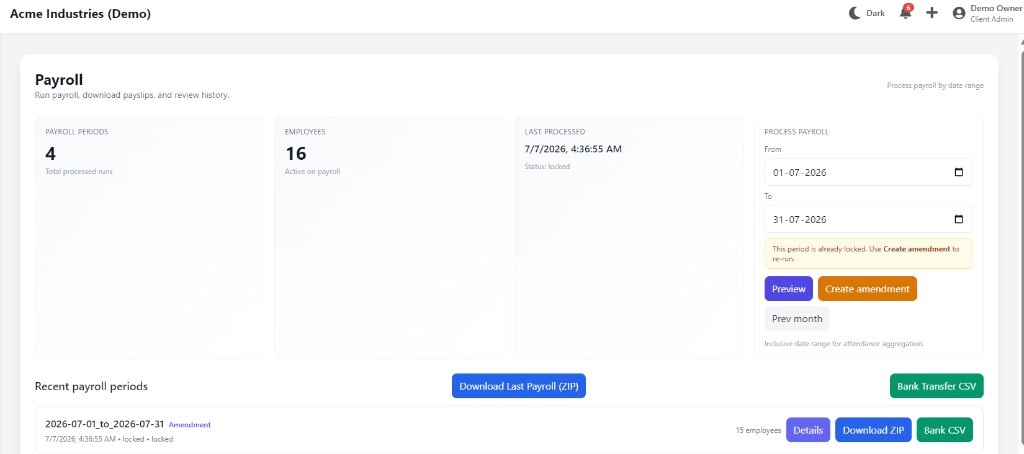
Overtime Management Software for Insurance Offices in Ranchi: overview
This guide covers payroll and HRMS for insurance offices in Ranchi: how it works in Attend Mitra, how a small team can run it without an HR department, and what to check before you pick a tool.
The short version: Attend Mitra gives you attendance-linked payroll, pf computation and esi applicability, running on employees' Android phones instead of a machine at the door. You can try it free for 14 days without a credit card.
Where payroll and HRMS goes wrong for insurance offices in Ranchi
Re-keying attendance into payroll
Present days and overtime are typed from a register into Excel, and errors become salary disputes.
PF and ESI worked out by hand
Wage ceilings and applicability rules are applied from memory each month.
Loss of pay argued at payday
Without approved leave records, every LOP deduction is questioned.
Payslip requests pile up
Employees ask HR for payslips that should be available on their phone.
How payroll and HRMS works in Attend Mitra
Payroll software is only as accurate as the attendance it starts from. Attend Mitra links the two: verified clock-ins, approved leave and recorded overtime feed attendance-linked payroll, so salary is calculated from the same data managers already approved during the month.
For Indian compliance, PF is calculated from the wage components and ceiling you configure, ESI applicability is handled per employee, and payroll exports include the salary register and a PF contribution summary to reconcile your ECR. The ECR upload and challan payment are still done by you on the EPFO portal, but the numbers you upload come straight from attendance.
What to check before you choose
- Is payroll calculated from verified attendance, or from a separate upload?
- Can you configure your own wage components and PF ceiling?
- Does the export give you what you need to reconcile the ECR?
- How are loss-of-pay days tied to approved leave?
- Can employees access payslips themselves?
Payroll and HRMS sized for small businesses
Small businesses don't need an HR department to run payroll and HRMS. They need something the owner or office manager can set up in an afternoon: import employees from Excel, choose how staff will clock in and share the app link.
Attend Mitra's Starter plan covers up to 20 employees with mobile attendance, GPS, face recognition, QR check-in and leave. When you add shifts, overtime or payroll reports, the Professional plan covers up to 100 employees.
- Starter plan for up to 20 employees.
- Set up from an Excel list, no IT team needed.
- Upgrade to Professional when you need shifts and payroll reports.
Payroll And Hrms for Insurance Offices in Ranchi
Ranchi's economy is built on mining-linked industries, engineering and education. Industrial and institutional employers manage staff across multiple sites and campuses.
For insurance offices in Ranchi, payroll and HRMS replaces registers that are filled in late or by someone else, and gives owners one view of attendance whether staff are at one site or spread across the city. Because Attend Mitra runs on employees' Android phones, there is no hardware to install at each location in Ranchi.
On compliance, establishments in Jharkhand register under the state's Shops and Establishments law or the Factories Act, depending on the type of business, and minimum wages are notified and revised by the state government. Jharkhand levies Professional Tax on salaries, so your payroll deductions include it alongside PF and ESI. Keeping verified attendance and overtime records makes it easier to show that wages were paid for the days and hours actually worked.
What insurance offices get from Attend Mitra
Banks, NBFCs and insurance offices run branch networks where staff, field officers and collection agents all need attendance recorded. For insurance offices, payroll and HRMS matters because of a simple problem: branch registers vary from office to office, and field officers have no reliable way to mark a day's start.
Branch attendance in one view
Every branch uses the same rules and reports to head office.
Field officers and agents
Collection and sales staff clock in from the field with GPS checks.
Office network check
Restrict branch staff clock-in to the branch Wi-Fi.
Payroll And Hrms features in Attend Mitra
Attendance-linked payroll
Salary is calculated from verified attendance, leave and overtime.
PF computation
Uses your configured wage components and PF ceiling.
ESI applicability
Handled per employee according to your settings.
Salary register export
One register to check before you pay.
PF contribution summary
Reconcile the monthly ECR before uploading on the EPFO portal.
Payslips
Generate payslips employees can access without calling HR.
Setting up payroll and HRMS in four steps
Configure wage components
Set up salary structure, PF ceiling and ESI settings.
Collect attendance
Verified clock-ins, leave and overtime build up through the month.
Run payroll
Calculate salaries from the approved attendance data.
Export and file
Download the salary register and PF summary, then file on the EPFO portal.
What You Gain With Attend Mitra
Month-end in minutes
Attendance totals are ready when the month closes, instead of after days of reconciling registers.
Stop buddy punching
GPS, selfie, and face verification ensure only the assigned employee can mark attendance.
Fewer payroll corrections
Accurate working hours and leave data mean fewer salary corrections and disputes.
Why Choose Attend Mitra
Quick to start
Import employees from Excel, configure a location and start a pilot the same week.
Plans sized by headcount
Starter for up to 20 employees, Professional for up to 100, Enterprise for larger teams.
Face verification included
Face recognition on the phone camera stops buddy punching without expensive hardware.
Frequently Asked Questions
Related Solutions
Everything on this page is part of Attend Mitra attendance software: GPS and selfie check-in, shifts, leave and payroll-ready reports in one place.
Ready to simplify workforce management?
Payroll software is only as accurate as the attendance it starts from. Built for insurance offices in Ranchi, with a 14-day free trial.