
Leave Application Software with Payroll Integration for Colleges in Chandigarh
Leave management replaces leave applications on paper and in WhatsApp with a request, an approval and a balance that everyone can see. Built for colleges in Chandigarh, with a 14-day free trial.
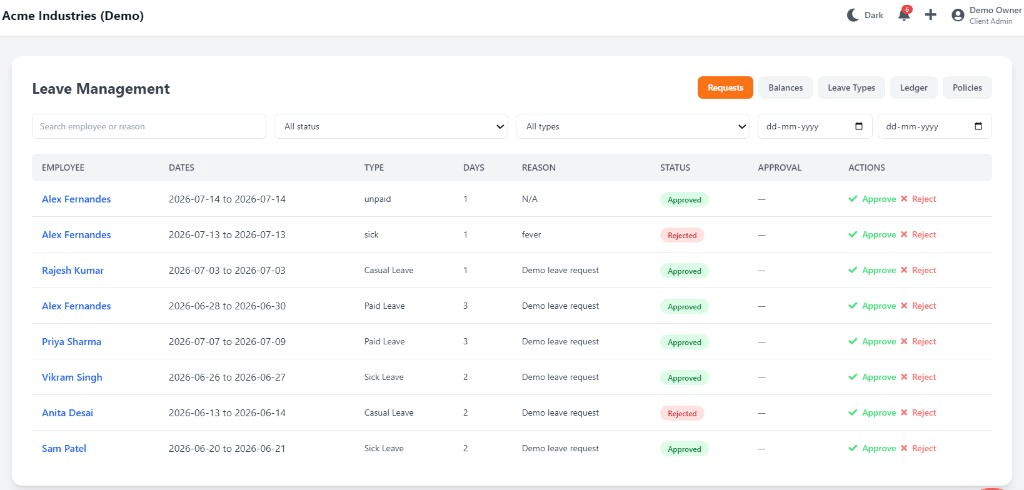
Leave Application Software with Payroll Integration for Colleges in Chandigarh: overview
This guide covers leave management for colleges in Chandigarh: how it works in Attend Mitra, how it connects to payroll, and what to check before you pick a tool.
The short version: Attend Mitra gives you apply from the app, manager approvals and automatic balances, running on employees' Android phones instead of a machine at the door. You can try it free for 14 days without a credit card.
Where leave management goes wrong for colleges in Chandigarh
Leave requests lost in chat
Approvals given on WhatsApp are forgotten by the time payroll runs.
Balances nobody trusts
Employees and HR keep different counts of leave remaining.
Absence or leave?
Without a record, HR can't tell an approved leave from a no-show.
Managers approve blind
Approvals happen without seeing who else is already off that day.
How leave management works in Attend Mitra
Leave management replaces leave applications on paper and in WhatsApp with a request, an approval and a balance that everyone can see. In Attend Mitra, employees apply for leave from the Android app, their manager approves or rejects it, and the balance updates automatically.
Because leave sits next to attendance, an approved leave day is never mistaken for an absence, and unapproved absences become loss of pay with a clear record behind them. Leave management is included from the Starter plan onward.
What to check before you choose
- Can employees apply and check balances from their phone?
- Do approvals update balances automatically?
- Does approved leave show correctly in attendance reports?
- Can you configure your own leave types?
- Is leave included in the entry plan, or an add-on?
Connecting leave management to payroll
The value of leave management shows up at month end. When attendance, approved leave and overtime already sit in one system, payroll starts from approved numbers instead of a register someone has to total by hand.
Attend Mitra's attendance-linked payroll calculates salaries from that data, computes PF from your configured wage components and exports a salary register and PF contribution summary. If you prefer your current payroll software, export the attendance report instead.
- Payroll starts from verified attendance.
- PF computation and salary register export.
- Or export attendance into your existing payroll tool.
Leave Management for Colleges in Chandigarh
Chandigarh's economy is built on services, education, healthcare and government. Service businesses and institutions often manage staff across Chandigarh, Mohali and Panchkula.
For colleges in Chandigarh, leave management replaces registers that are filled in late or by someone else, and gives owners one view of attendance whether staff are at one site or spread across the city. Because Attend Mitra runs on employees' Android phones, there is no hardware to install at each location in Chandigarh.
On compliance, establishments in Chandigarh (Union Territory) register under the state's Shops and Establishments law or the Factories Act, depending on the type of business, and minimum wages are notified and revised by the state government. Keeping verified attendance and overtime records makes it easier to show that wages were paid for the days and hours actually worked.
What colleges get from Attend Mitra
Schools and institutes manage teaching and non-teaching staff, sometimes across several campuses. For colleges, leave management matters because of a simple problem: substitute arrangements are made at the last minute, and leave balances are tracked on paper.
Teaching and non-teaching staff
One attendance system for faculty, admin and support staff.
Leave and substitutes
Approved leave is visible in time to arrange cover.
Multi-campus attendance
Separate geo-fence for each campus, one report for management.
Leave Management features in Attend Mitra
Apply from the app
Employees request leave from their phone.
Manager approvals
Approve or reject with the request details in front of you.
Automatic balances
Balances update as leave is approved.
Leave types
Set up the leave categories your company offers.
Linked to attendance
Approved leave shows correctly in the attendance record.
Payroll-ready
Leave and loss-of-pay days feed payroll reports.
Setting up leave management in four steps
Set leave types
Configure the leave categories and allowances you offer.
Employees apply
Requests are raised from the app with dates and reason.
Managers decide
Approve or reject, and the balance updates.
Payroll picks it up
Approved leave and LOP flow into payroll reports.
What You Gain With Attend Mitra
Scale without new registers
Add locations and employees without changing your process.
Records you can produce
Verified attendance history for inspections, audits and client billing.
Fewer calls to HR
Employees check their own attendance, leave and shifts in the app.
Why Choose Attend Mitra
Payroll & compliance ready
PF computation, salary register and PF contribution summary exports for Indian payroll.
Built for Indian businesses
Designed for security agencies, restaurants, factories, retail chains, and field teams — not generic global HR.
No mandatory hardware
Start with mobile attendance on employees' Android phones. No terminal per site.
Frequently Asked Questions
Related Solutions
See how it fits into the complete attendance software for Indian businesses, from the first check-in to month-end payroll reports.
Ready to simplify workforce management?
Leave management replaces leave applications on paper and in WhatsApp with a request, an approval and a balance that everyone can see. Built for colleges in Chandigarh, with a 14-day free trial.