
Field Worker GPS Tracking Software with a Free Trial
Field employees such as sales reps, service technicians, delivery staff and merchandisers start their day somewhere other than the office, which is exactly where paper attendance fails. Built for teams across India, with a 14-day free trial.
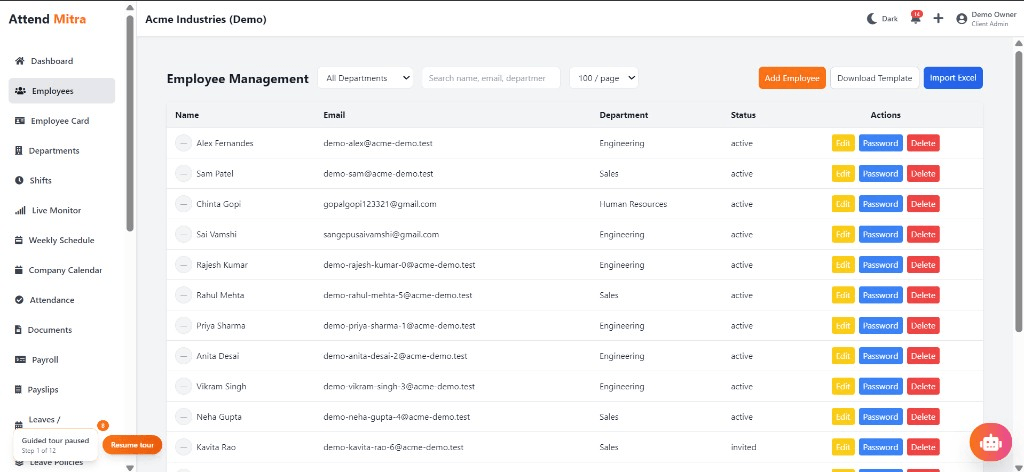
Field Worker GPS Tracking Software with a Free Trial: overview
This guide covers field employee tracking for businesses: how it works in Attend Mitra, what you get before paying anything, and what to check before you pick a tool.
The short version: Attend Mitra gives you clock in from the field, gps at clock-in and clock-out and face verification, running on employees' Android phones instead of a machine at the door. You can try it free for 14 days without a credit card.
Where field employee tracking goes wrong for businesses
Start-of-day check-in calls
Supervisors spend the first hour calling reps to ask where they are.
Hours nobody can verify
Field staff are paid a full day whether they started at 9 or at 11.
Proxy attendance in teams
One rep marks attendance for the whole beat group from one phone.
Overtime claims without proof
Late visits are claimed as overtime with no record of when the day actually ended.
How field employee tracking works in Attend Mitra
Field employees such as sales reps, service technicians, delivery staff and merchandisers start their day somewhere other than the office, which is exactly where paper attendance fails. Attend Mitra lets them clock in from the Android app wherever their assigned work location is, with GPS and face checks confirming the place and the person.
Managers see who is on duty in the live attendance monitor and get location-stamped clock-in and clock-out records for every day. Working hours and overtime come from those records, so field teams are paid on what the data shows, not on what was reported by phone.
What to check before you choose
- Can field staff clock in at a client location, not just the office?
- Does the record show where the day started and ended?
- Is there a face or selfie check to stop proxy attendance?
- Can managers see who is on duty right now?
- Is location captured at clock-in and clock-out rather than all day, which is easier for staff to accept?
What “free” really means for field employee tracking
Most “free” field employee tracking tools are either a trial or a plan so limited that you outgrow it in the first month. Attend Mitra is upfront about it: every paid plan starts with a 14-day free trial of the Professional features, with no credit card required, so you can run a real month-end on your own data before deciding.
When comparing free options, look at what happens at your real headcount, whether exports are locked behind an upgrade, and whether you can take your attendance data with you if you leave.
- 14-day free trial with full Professional features.
- No credit card needed to start.
- Starter plan for up to 20 employees when you're ready to pay.
Benefits for your team
Accurate daily attendance
Replace manual registers with mobile, GPS, or face-verified check-in.
Leave & shift management
Handle leave requests and shift rosters in one place.
Payroll-ready reports
Export present days, overtime, and LOP directly for salary processing.
Field Employee Tracking features in Attend Mitra
Clock in from the field
Employees mark attendance from their phone at their assigned location.
GPS at clock-in and clock-out
Each entry records where the day started and ended.
Face verification
Confirms the rep is the one clocking in, even on a shared phone.
Live attendance monitor
Managers see who has started work across the team.
Working hours and overtime
Hours are calculated from actual clock-in and clock-out times.
Leave from the app
Field staff apply for leave without visiting the office.
Setting up field employee tracking in four steps
Assign territories
Link each field employee to the locations they work from.
Clock in on the move
Staff slide to clock in with GPS and face checks.
Monitor the day
Managers watch live attendance instead of calling around.
Pay on verified hours
Export working hours and overtime for payroll.
What You Gain With Attend Mitra
Fewer calls to HR
Employees check their own attendance, leave and shifts in the app.
Month-end in minutes
Attendance totals are ready when the month closes, instead of after days of reconciling registers.
Stop buddy punching
GPS, selfie, and face verification ensure only the assigned employee can mark attendance.
Why Choose Attend Mitra
No mandatory hardware
Start with mobile attendance on employees' Android phones. No terminal per site.
Quick to start
Import employees from Excel, configure a location and start a pilot the same week.
Plans sized by headcount
Starter for up to 20 employees, Professional for up to 100, Enterprise for larger teams.
Frequently Asked Questions
Related Solutions
Everything on this page is part of Attend Mitra attendance software: GPS and selfie check-in, shifts, leave and payroll-ready reports in one place.
Ready to simplify workforce management?
Field employees such as sales reps, service technicians, delivery staff and merchandisers start their day somewhere other than the office, which is exactly where paper attendance fails. Built for teams across India, with a 14-day free trial.